
How to Repurpose One Podcast Episode into 5 Pieces of Content (2025 Guide)
Don't let your podcast episodes die after launch. Learn the 'Content Waterfall' method to turn one episode into a blog post, newsletter, LinkedIn update, and show notes instantly.
How to Repurpose One Podcast Episode into 5 Pieces of Content (2025 Guide)
In 2025, podcasting is booming—with over 580 million global listeners. Yet, most creators are stuck on the "Podcaster's Treadmill":
You invest 3 hours prepping, 90 minutes recording, and 2 hours editing an episode. You hit publish. You get a spike of downloads on Tuesday. And by Thursday... silence.
The harsh reality? Audio remains invisible to search engines. Google can't "listen" to your 45-minute deep dive to index it. Without repurposing, you are leaving 80% of your potential audience on the table—those who search for solutions via Google, not Spotify.
But who has time to write a blog post, a newsletter, and a LinkedIn thread after producing an episode?
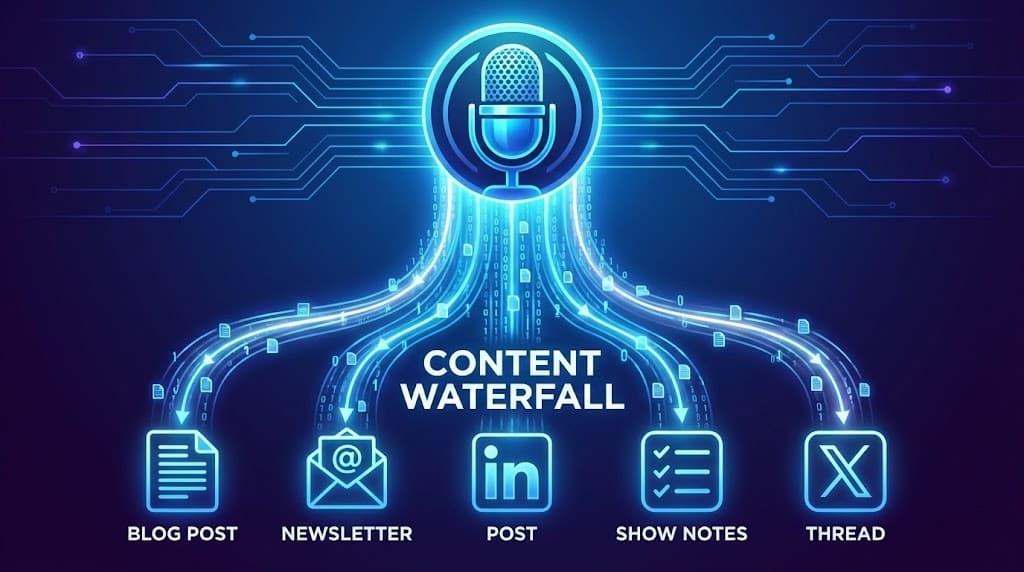
Enter the "Content Waterfall": An AI-powered workflow that transforms one episode into a week's worth of assets.
Here is how to use UserRecaply to turn one audio file into 5 marketing pieces, saving you 4+ hours per episode.
Key Takeaways
- The Visibility Gap: Audio doesn't rank; text does. Repurposing unlocks SEO for podcasts.
- The Waterfall Method: Create one "hero" asset (the podcast) and let AI slice it into smaller pieces for every platform.
- Transform, Don't Transcribe: A raw transcript is useless for marketing. You need structured, engaging content.
- The Workflow: Record -> Upload -> Generate 5 Assets instantly.
Table of Contents
- Why Audio-Only Podcasting Limits Your Reach
- The 5 Assets You Can Generate from 1 Upload
- Step-by-Step Content Waterfall Workflow
- Raw Transcription vs. AI Repurposing
- FAQ – Repurposing Questions
Why Audio-Only Podcasting Limits Your Reach
Picture writing a bestselling book and then locking it in a chest that only opens for people who happen to walk by at the exact moment you unlock it. That's podcasting without repurposing.
Why you need text in 2025:
- SEO (Search Engine Optimization): A blog post based on your episode lets new audiences find you via search months later.
- Accessibility: Text aids hearing-impaired users and allows consumption in noisy environments.
- Scannability: Busy listeners want to scan the highlights before committing 45 minutes of their ears to you.
The 5 Assets You Can Generate from 1 Upload
Forget copy-pasting a messy transcript. When you upload an episode to UserRecaply, the AI analyzes the structure to generate distinct assets.
1. The SEO Blog Post
- What it is: A structured article with H2 headings, clear paragraphs, and keywords.
- Why you need it: This is your long-term traffic engine. (It uses the same AI logic we recommend for writers dictating books).
2. Enhanced Show Notes
- What it is: A punchy summary, a list of topics discussed with timestamps, and resource links.
- Why you need it: Essential for Apple Podcasts/Spotify SEO to help listeners navigate the episode.
3. The Newsletter Blurb
- What it is: A conversational teaser with value hooks for your subscribers.
- Why you need it: To drive immediate downloads from your most loyal fans.
4. The LinkedIn Authority Post
- What it is: A "Key Takeaway" list formatted for professional engagement (e.g., "3 things I learned interviewing X").
- Why you need it: To build thought leadership in your niche.
5. The Viral Twitter/X Thread
- What it is: A series of 5-7 punchy tweets summarizing the most controversial or insightful points.
- Why you need it: For reach and engagement on social media.
Step-by-Step Content Waterfall Workflow
Stop trying to do everything manually. Here is the 10-minute workflow for a week of content.
Step 1: Record Your Episode
Standard prep.
- Mobile Tip: If you record interviews on the go, use your phone (see our guides for iPhone and Android).
- Interview Tip: Ensure you have clear audio from both sides (see our Interview Transcription Guide).
Step 2: Upload to UserRecaply
Take your final MP3/WAV file and drag it into the dashboard.
Step 3: AI Generation (5 Minutes)
The AI analyzes the dialogue, identifies the speakers, and extracts the core value propositions.
Step 4: Copy, Paste, Schedule
You get a dashboard with all 5 assets ready to go.
- Copy the Blog Post to WordPress.
- Copy the Show Notes to your podcast host.
- Copy the Tweets to your scheduling tool (Buffer, etc.).
Result: You just saved 4 hours of writing work.
Raw Transcription vs. AI Repurposing
Many podcasters make the mistake of just publishing a raw transcript.
| Feature | Raw Transcript (The Old Way) | AI Repurposing (UserRecaply) |
|---|---|---|
| Readability | Low (Wall of text, "ums") | High (Clean, engaging prose) |
| SEO Value | Medium (Keywords present but messy) | High (Structured H2s, Lists) |
| Social Ready? | No | Yes (Platform-native threads) |
| Time Savings | None | 80% faster creation |
FAQ – Repurposing Questions
Q: Does it work for multi-speaker interviews? A: Yes. The AI uses speaker identification to distinguish between the host and the guest, structuring the output accordingly.
Q: Can it handle technical niches? A: Absolutely. Whether it's coding or crypto, the AI captures the jargon accurately.
Q: Can I edit the output? A: Yes. We provide a 95% finished draft. You should always add your final human touch and opinion before publishing.
Stop Working Harder. Let Your Content Work for You.
You've already done the hard work of creating the audio. Don't let that effort go to waste.
Build your content waterfall today and dominate every platform without burning out.